Reactjs/Threejs
[React / Three] Stats Panel / OrbitControls
Watertight
2023. 1. 19. 05:36
1. Three.js App 개발할때 유용한 도구로 Stats Panel이 있다. 기본적으로 응용 프로그램의 프레임 속도가 표시되며, Stats Panel을 사용하면 최적화를 고려해야 하는지 또는 다른 접근 방식을 시도해야 하는지 여부를 빠르게 확인할 수 있다. Stats는 @react-three/drei를 추가해야 한다. @react-three/drei는 React Three Fiber와 함께 작동하도록 최적화된 유용한 도우미 및 모듈 모음이다.
npm install @react-three/drei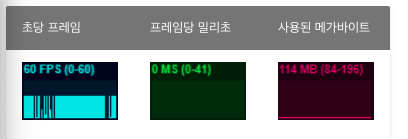
2. OrbitControls은 Panning, Rotating과 Zooming을 할 수 있게 한다. 각각을 활성화/비활성화할 수 있고, 회전량을 제한할 수도 있다.
<OrbitControls
  enablePan={false} enableRotate={false}
  minAzimuthAngle={-Math.PI / 4}
  maxAzimuthAngle={Math.PI / 4}
  minPolarAngle={Math.PI / 6}
  maxPolarAngle={Math.PI - Math.PI / 6}
/>
import { Canvas } from '@react-three/fiber'
import Polyhedron from './Polyhedron'
import * as THREE from 'three'
import { Stats, OrbitControls } from '@react-three/drei'
export default function App() {
const polyhedron = [
new THREE.BoxGeometry(),
new THREE.SphereGeometry(0.785398),
new THREE.DodecahedronGeometry(0.785398),
]
return (
<Canvas camera={{ position: [0, 0, 3] }}>
<Polyhedron position={[-0.75, -0.75, 0]} polyhedron={polyhedron} />
<Polyhedron position={[0.75, -0.75, 0]} polyhedron={polyhedron} />
<Polyhedron position={[-0.75, 0.75, 0]} polyhedron={polyhedron} />
<Polyhedron position={[0.75, 0.75, 0]} polyhedron={polyhedron} />
<OrbitControls />
<Stats />
</Canvas>
)
}